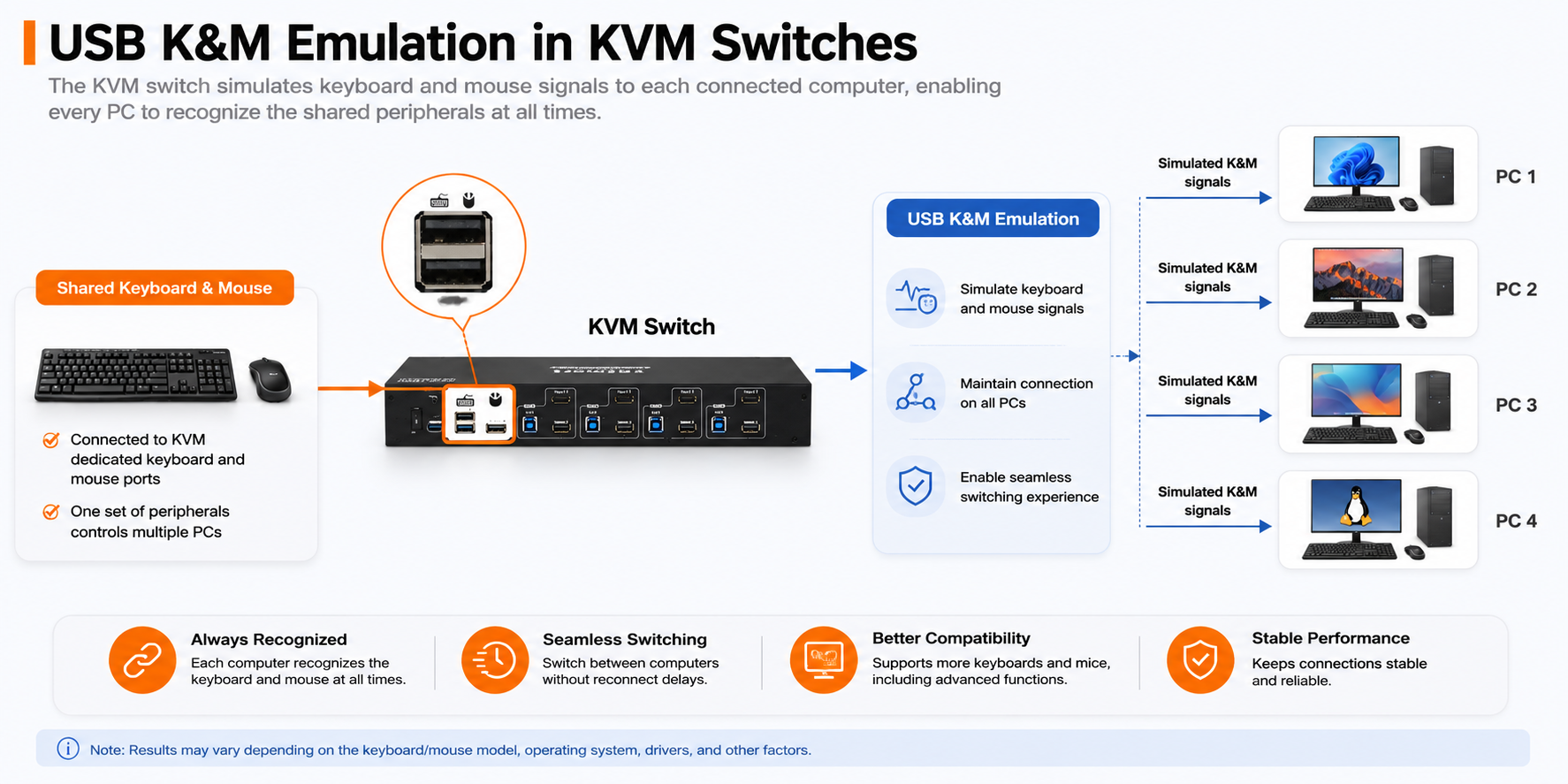
When using a KVM switch, users expect the shared keyboard and mouse to work immediately after switching between computers. However, different keyboards and mice communicate with computers in different ways. Standard office peripherals usually work with basic USB keyboard and mouse emulation, while gaming devices, wireless receivers, multimedia keyboards, and programmable mice may require broader USB compatibility.
TESmart KVM switches use USB keyboard and mouse emulation to help connected computers continuously recognize shared peripherals. Some supported models also provide Pass-Through mode, which allows more of the original keyboard and mouse information to be transmitted to the active computer.
This article explains how these two functions work and when each mode should be used.
What Is USB Keyboard and Mouse Emulation?
USB keyboard and mouse emulation, also called USB K&M Emulation, is a function used in many KVM switches.
The KVM presents a simulated standard keyboard and mouse connection to each connected computer. As a result, the computers continue to detect keyboard and mouse devices even when they are not currently selected. This helps maintain stable device recognition during switching.
Main benefits
- Keep the keyboard and mouse recognized by connected computers
- Reduce device disconnection and reconnection during switching
- Improve switching response
- Maintain KVM hotkey functions
- Prevent some computers from losing keyboard and mouse detection
- Provide stable operation with standard USB keyboards and mice
In practical use, each computer recognizes a simulated keyboard and mouse connection through the KVM, while the physical keyboard and mouse remain connected to the KVM’s dedicated ports.
The Role of DDM in KVM Device Emulation
Traditional USB KVM devices often utilize peripheral emulation to send signals to computers not currently selected, simulating the presence of a connected keyboard, mouse, and monitor. This emulation is crucial for avoiding issues with machines that may reboot during unattended operation. However, it comes with limitations and inconsistencies, especially when dealing with various types of I/O devices.
DDM takes KVM device emulation to the next level by eliminating the need for generic device emulation. With DDM, each connected computer system believes that all I/O devices remain connected, even when the KVM switch shifts to another port. This innovative approach ensures a seamless experience without the interruptions or inconsistencies associated with traditional emulation methods.
Enhanced User Experience with Passthrough Mode
TESmart's KVM switches incorporate a Pass-through mode, a built-in feature primarily utilizing DDM technology. This mode significantly improves the compatibility of keyboards and mice, providing users with an experience akin to a direct connection to the computer. In Passthrough mode, users can enjoy a broader range of keyboard and mouse functionalities by connecting the keyboard and mouse to the dedicated keyboard and mouse ports, including special features not supported by traditional KVM switches.
At the USB protocol level, the Passthrough mode in TESmart's products ensures the transmission of authentic device descriptors to the computer. This guarantees that keyboards and mice connected to the KVM switch maintain the same functionality as when directly connected to the computer. In contrast to many other KVMs on the market, which simulate a USB Composite Device internally, TESmart's approach allows for seamless and full-functioning use of peripherals.
Switching between input source devices on TESmart's KVM switches does not result in the disconnection of the connected keyboard and mouse from any PC. The internal selector in the product ensures real-time transmission of USB data to the correct PC. This eliminates the inconvenience of frequent device disconnects and reconnects, enabling immediate use of keyboards and mice when switching between input source devices. It's a time-saving solution that enhances overall productivity.
TESmart's Product Recommendations with Pass-through Mode
Most of TESmart's products support Pass-through mode. There are two notable products:
1. TESmart 2 Port Dual-Monitor HDMI KVM Switch -
HKS202-P23 (Previously HKS0202A2U): This switch supports dual monitors and features Pass-through mode with DDM technology. It ensures a smooth and uninterrupted experience, allowing users to switch between connected devices without any disruption to the keyboard and mouse, which are connected to the dedicated keyboard and mouse ports on the KVM.
2. TESmart 4 Port Dual-Monitor HDMI KVM Switch -
HKS402-P23 (Previously HKS0402A2U): With support for dual monitors and the innovative Pass-through mode, this KVM switch provides a high-quality display experience. Passthrough mode ensures that keyboards and mice maintain optimal functionality, offering users a hassle-free and efficient switching process.
Conclusion
Dynamic Device Mapping technology represents a significant leap forward in the realm of KVM switches. By ensuring continuous communication between peripherals and connected systems, DDM eliminates the drawbacks associated with standard device emulation. TESmart's integration of DDM technology in Pass-through mode redefines the KVM switch experience, ensuring compatibility, flexibility, and a seamless transition between connected devices. Explore the enhanced features of these products for an elevated KVM switch experience.
If you need additional assistance, please feel free to reach out to our
customer support center via the contact information located in the bottom right popup widget of our official website for assistance. We are here to help.

Comments
0 comments